Untitled 2D Sprite Project
1. Ecosystem
- Build system
- Unix-like platforms (Ubuntu, Gentoo, etc.)
- Targeted on Nintendo 3DS
- devkitPro 3ds-dev
- citro2d library
2. Setup
Follow the guidelines from the devkitPro website
3. Basic Sprite Animation
master branch #2dce989
A simple basic animation using the citro2d library. The 3DS models and system versions we tesetd are:
| Model | System version |
| New Nintendo 3DS LL | Sys 11.14.0-46J |
The Citra versions we tested are:
| Build | Release version |
| Citra Canary | 1992 |
Adding sprites
- Add sprites which you want to animate in the gfx folder.
- Add sprite names into the
sprites.t3s.
- Note: The
sprites.t3s file must(?) be included in the gfx folder and the format should be like (need more research): --atlas -f rgba8888 -z auto
frame_00_delay-0.1s.png
frame_01_delay-0.1s.png
frame_02_delay-0.1s.png
frame_03_delay-0.1s.png
frame_04_delay-0.1s.png
frame_05_delay-0.1s.png
frame_06_delay-0.1s.png
frame_07_delay-0.1s.png
frame_08_delay-0.1s.png
frame_09_delay-0.1s.png
- Load the sprite using
C2D_SpriteSheetLoad(). spriteSheet = C2D_SpriteSheetLoad("romfs:/gfx/sprites.t3x");
if (spriteSheet == NULL) {
svcBreak(USERBREAK_PANIC);
}
Frame rate update
- Set a desired sprite refresh time (unit: ms)
static uint64_t sprite_refresh_ms_time = 30;
- Get a time from the begining of the while loop
- Calculate the elaspsed time before drawing the sprite
stop = osGetTime();
ms_time_elapsed += (stop - start);
- Check that the elapsed time is greater than or equal to the deisred sprite refresh time (
sprite_refresh_ms_time) if (ms_time_elapsed >= sprite_refresh_ms_time) {
ms_time_elapsed -= sprite_refresh_ms_time;
current_frame_index = (current_frame_index + 1) % MAX_SPRITES;
C3D_FrameBegin(C3D_FRAME_SYNCDRAW);
C2D_TargetClear(top, C2D_Color32f(0.0f, 0.0f, 0.0f, 1.0f));
C2D_SceneBegin(top);
C2D_DrawSprite(&reimu_sprite[current_frame_index]);
}
Result
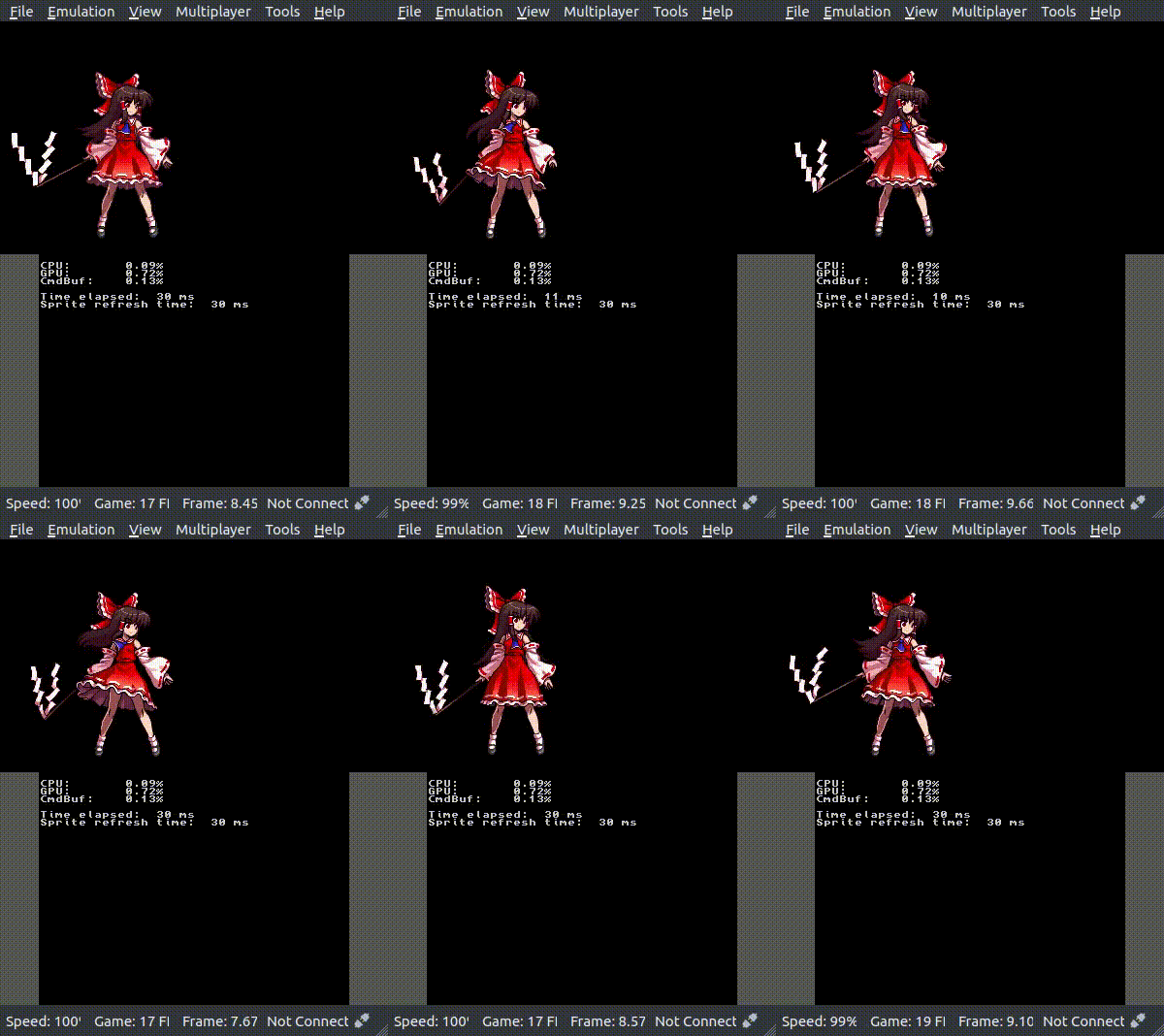
Reimu sprite animation (idle) (Animation source: Touhou 13.5: Shinkirou - Hopeless Masquerade)
Limitations
- Wrong frame rate indication in Citra
4. Sprite Animation Manager
Implementation (TODO)
Basic features
- [x] Load sprites
- [x] Set sprite origin, position, rotation
Animation state controller
- [ ] Play loop or once
- [ ] State machine
Sprite pose manager
- [ ] AABB detection
- [ ] Collison activation
- [ ] Gravity activation
- [ ] x or y direction lock
The 3DS models and system versions we tesetd are:
| Model | System version |
| New Nintendo 3DS LL | Sys 11.14.0-46J |
The Citra versions we tested are:
| Build | Release version |
| Citra Canary | 1992 |
Assumptions
- Object is a 2D object which contains sprites, a pivot, a position, and a roation.
- Object can be affected by a gravity or not.
Basic features
In sprite_animation_manager.h, there is a initialize_object() to initialze 2D object. the initialize_object() has lots of initialization features as follows:
- Load spirtes from the file name
- Position
- Pivot point
- Rotation (in radians)
- Animation refresh time
static C2D_Sprite reimu_sprite[MAX_SPRITES];
static float reimu_roation = 0.0f;
static uint64_t sprite_refresh_ms_time = 30;
reimu_sprite, \
"romfs:/gfx/sprites.t3x", \
reimu_pivot, \
reimu_position, \
reimu_roation, \
sprite_refresh_ms_time);
void initialize_object(object_2d_info_t *object, C2D_Sprite *sprites, const char *filename, const sprite_pivot_t pivot, const sprite_position_t position, const float rotation, uint64_t animation_refresh_time)
Initialize 2D object.
Definition: sprite_animation_manager.c:3
Definition: sprite_animation_manager.h:41
Definition: sprite_animation_manager.h:19
Definition: sprite_animation_manager.h:24
After the object initialized, draw sprite using draw_sprite_animation()
C3D_FrameBegin(C3D_FRAME_SYNCDRAW);
C2D_TargetClear(top, C2D_Color32f(0.0f, 0.0f, 0.0f, 1.0f));
C2D_SceneBegin(top);
void draw_sprite_animation(object_2d_info_t *object)
Draw sprite animation from the 2D object.
Definition: sprite_animation_manager.c:50
When the application ends, any sprites or graphics must be freed.
C2D_SpriteSheet spritesheet
2D object Spritesheet information
Definition: sprite_animation_manager.h:43
- Note: Using
C2D_SpriteSheetFree() to free will be deprecated in the next commit.
A. Other things to do
Found the useful links to make a documentation using doxygen

 1.9.3
1.9.3